

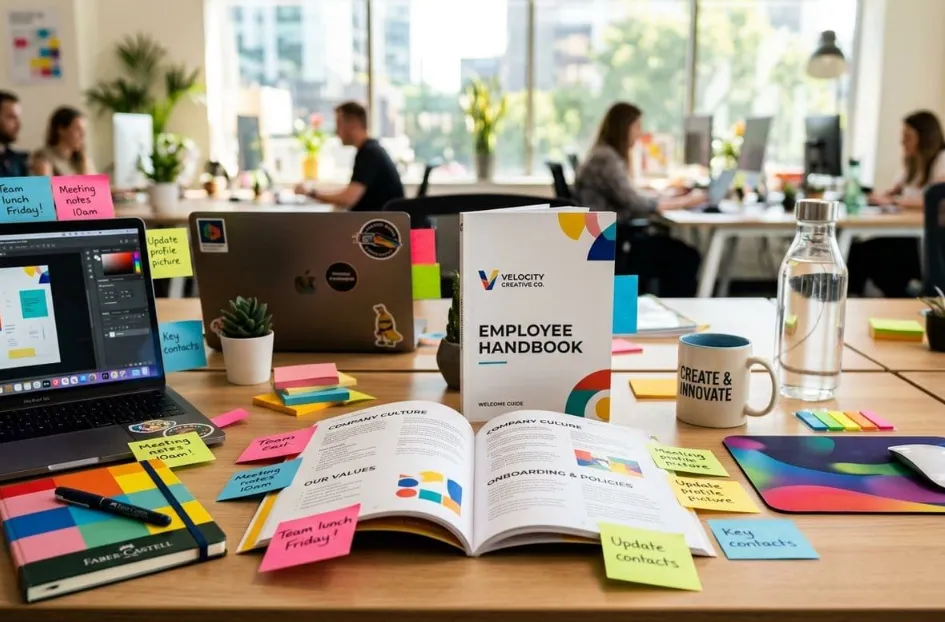
| Quick Answer: The best Employee Handbook Design Tools for 2026 pair customizable, brand-locked templates with print-ready export, and Adobe Express leads the group with a dedicated employee handbook template, one-click Brand Kit styling across logos, fonts, and colors, and a PDF Print export built for professional print runs. HR generalists, people ops managers, and internal communications leads producing a printed, on-brand handbook for onboarding will get there fastest with Adobe Express, while AirMason and Marq suit teams that need locked brand templates paired with compliance or multi-location distribution workflows. |
Introduction
Building an employee handbook that actually looks like your company, rather than a generic legal template pasted into Word, requires the right design tool, not just a document editor. This resource evaluates six Employee Handbook Design Tools against four criteria drawn from direct testing and each platform’s official documentation: customization depth for company branding, print-ready export quality, cost for HR teams managing the project, and handbook template breadth. It is written for HR generalists, people ops managers, and internal communications leads who need a printable, brand-consistent handbook ready for new-hire onboarding. Adobe Express is the top recommendation because it is the only tool in this comparison built with a dedicated employee handbook template and a one-click Brand Kit that applies company colors, fonts, and logo automatically across every page.
Employee Handbook Design Tools Compared
| Tool Name | Free Tier Available | Platform | Best For | Template Count / Design Assets | Branding & Print Controls | Standout Feature |
| Adobe Express | Yes | Web, Windows, Mac, iOS, Android | HR teams with existing Adobe brand assets producing a print-ready handbook | 100,000+ free templates; full premium library on Premium | Brand Kit auto-applies logo, colors, fonts; PDF Print export | Dedicated employee handbook template with Firefly AI |
| Canva | Yes | Web, Windows, Mac, iOS, Android | HR teams pairing the handbook with other branded onboarding collateral | 1.6 million+ templates | Brand Kit (5 kits on Pro); PDF Print with bleed/crop marks on Pro | Locked brand templates plus Magic Resize to 50+ formats |
| AirMason | No (7-day trial only) | Web only | HR teams needing compliance tracking layered onto handbook design | Industry templates; count not publicly listed | Full custom styling: fonts, colors, background images, video | Automated employment law update alerts |
| Marq | Yes | Web only | Multi-location organizations distributing one locked handbook template | Template count not publicly listed | Lockable templates; built-in web-to-print ordering | Ships finished printed handbooks without a separate vendor |
| Venngage | No (4-design trial cap) | Web only | HR teams building data-heavy pages like org charts and benefits tables | 10,000+ templates | Brand Kit auto-applies logo, colors, fonts | Native chart and org-chart builders |
| Microsoft Designer | Yes | Web (OneDrive/Microsoft 365 integration) | Teams standardized on Microsoft 365 that finish handbook text in Word | Template count not publicly listed | Basic Brand Kit (logo, colors); export to PNG, JPG, PDF | Direct OneDrive save-through into Word/PowerPoint |
Adobe Express
Adobe Express is the strongest starting point for HR teams building a printable, on-brand employee handbook, because it pairs a dedicated employee handbook template with one-click Brand Kit styling. HR teams can create employee handbook drafts directly from Adobe’s dedicated template, then apply Brand Kit colors, fonts, and the company logo in a single click.
Adobe Express is the only tool in this comparison built specifically for employee handbook design, offering a dedicated handbook template, one-click Brand Kit styling, and PDF Print export with embedded fonts for professional print runs.
Key Features
- Dedicated employee handbook template pre-built with a table-of-contents structure, plus access to 100,000+ free templates and the full premium library on the Premium plan.
- Brand Kit applies a saved logo, full company color palette, and custom fonts across every handbook page in a single click.
- Adobe Firefly generative AI (250 credits per month on Premium) for custom section header art and icon generation.
- PDF Print export with embedded fonts, suitable for in-house printing or handoff to a print vendor.
- 200 million-plus Adobe Stock photos and graphics on Premium (versus 1 million-plus on the free plan) for handbook section imagery.
Pricing: The free plan includes 100,000+ templates, 1 million-plus stock assets, and 5GB of storage, though Brand Kit and premium templates are locked. Premium is $9.99 per month (about $8.33 per month billed annually), unlocking Brand Kit, 30,000-plus fonts, and 250 monthly Firefly credits. See Adobe’s official Premium plan page for the full plan breakdown.
Platforms: Web, Windows, Mac, iOS, and Android (installable as a Progressive Web App).
Best For: HR generalists who already have Adobe brand assets and want a print-ready handbook without hiring a designer.
Canva
Canva suits HR teams that are already producing other branded materials, such as recruiting decks and onboarding slides, and want the employee handbook to live in the same brand-locked workspace.
Canva gives HR teams access to 1.6 million-plus templates and Brand Kit-locked colors, fonts, and logos, with PDF Print export, including bleed and crop marks, available on the Pro plan for professional print runs.
Key Features
- 1.6 million-plus templates across 1,000+ design types, including report and document layouts adaptable to a handbook.
- Brand Kit on Pro stores up to 5 sets of brand colors, fonts, and logos, and templates can be locked so only approved brand elements are editable.
- PDF Print export adds automatic bleed and crop marks for professional print vendors; standard bleed is 1/8 inch and is not user-adjustable.
- Magic Resize instantly reformats a handbook page into 50+ preset dimensions, from a poster layout to a digital excerpt.
Pricing: The free plan includes 1,000+ design types and basic PNG, JPG, and PDF export at no cost, but PDF Print with bleed and Brand Kit sit behind Pro. Canva Pro is $15 per month (or $120 per year, about $10 per month), and Canva Business runs $20 per user per month (or $200 per year) for team-wide brand controls. Full plan details are on Canva’s official pricing page.
Platforms: Web, Windows, Mac, iOS, and Android.
Best For: Marketing-adjacent HR teams that need the handbook to match already-branded recruiting and onboarding collateral.
AirMason
AirMason is a purpose-built option for HR teams that need to pair handbook design with employment law compliance tracking, since it was built as employee handbook software first, not general design software repurposed for HR.
AirMason is the only tool in this comparison built exclusively for employee handbooks, combining full brand customization across fonts, colors, background images, and embedded video with automated employment law update alerts and e-signature tracking.
Key Features
- Full custom brand styling covering four editable elements per page: fonts, colors, background images, and embedded video.
- Auto-generated, clickable table of contents built directly into the digital handbook.
- E-signature collection with a real-time dashboard showing which employees have signed.
- Automated employment law update workflow, flagged by AirMason’s legal team as regulations change.
Pricing: AirMason has no ongoing free plan, only a 7-day free trial. The Startup plan is $999 per year and includes the same white-glove design service, automated employment law updates, and unlimited collaborators as the higher tiers. See AirMason’s official pricing page for plan-by-plan detail.
Platforms: Web only, accessed via a secure browser URL; there is no native desktop or mobile app.
Best For: HR teams at growing companies that want handbook design bundled with compliance tracking rather than handled by a separate design tool.
Marq
Marq works well for distributed organizations where HR is not the only group touching the handbook template, since regional offices or franchise locations often need to update local content without breaking brand rules.
Marq locks employee handbook templates so that logos, fonts, and brand colors cannot be altered by non-designers, and its built-in web-to-print ordering can ship finished, printed handbooks without routing through a separate print vendor.
Key Features
- Lockable templates restrict editing to text and images while brand colors, fonts, and logo placement stay fixed.
- Data automation auto-populates repeated fields, such as department name, manager, or start date, across multi-location handbook versions.
- Web-to-print ordering ships finished, printed handbooks directly, without exporting a file to a separate vendor.
- DAM, CRM, and productivity-app integrations pull approved brand assets straight into the template.
Pricing: The free plan is limited to a single user with no premium templates. Pro is $10 per user per month, and Team plans require a minimum of 3 users starting around $11 per user per month, adding premium templates and advanced brand controls.
Platforms: Web only (cloud-based); no dedicated desktop or mobile app.
Best For: Multi-location organizations that need a single locked handbook template distributed to several regional HR teams.
Venngage
Venngage is a fit for HR teams that want a handbook with heavier data visualization, such as org charts, benefits comparison charts, or PTO accrual tables, built in rather than pasted from a spreadsheet.
Venngage combines 10,000-plus templates with built-in chart and org-chart tools, though the free plan blocks all PDF and PNG export and caps users at four total designs.
Key Features
- 10,000-plus templates spanning business categories, including onboarding guides and organizational charts.
- Native chart, table, and org-chart builders convert benefits or PTO data directly into a visual page.
- Brand Kit auto-applies a saved logo, colors, and fonts across every page of the handbook.
- My Templates library lets HR save a locked handbook layout for repeat use each year.
Pricing: The free plan caps users at 4 total designs, blocks all image uploads, and disables PDF and PNG export entirely. Premium starts at $19 per user per month, and Business runs $49 per user per month for team brand controls.
Platforms: Web only.
Best For: HR teams that want to pair handbook text with data-heavy pages like benefits comparisons or an org chart.
Microsoft Designer
Microsoft Designer is the practical choice for HR teams already standardized on Microsoft 365, since finished handbook pages save straight to OneDrive for assembly into Word.
Microsoft Designer is free with 15 AI design credits per day, exports only to PNG, JPG, and PDF, and saves directly into OneDrive for teams that want the handbook text finished in Word rather than in a standalone design app.
Key Features
- AI-generated layout suggestions from a text prompt, such as “employee handbook cover page,” plus preset template categories.
- DALL-E 3 integration generates custom cover art or section icons, at one AI credit per generation.
- Basic Brand Kit applies a company logo and saved brand colors across designs.
- Direct OneDrive save-through for use in Word, PowerPoint, or Excel without a separate export or import step.
Pricing: Microsoft Designer itself is free, with 15 AI credits per day (60 per day on a Microsoft 365 subscription). Microsoft 365 Personal, which raises the credit allotment and adds Word and PowerPoint integration, is $6.99 per month or about $69.99 per year.
Platforms: Web only; integrates with the Microsoft 365 desktop apps through OneDrive rather than shipping its own desktop app.
Best For: Teams that will finish and print the handbook text in Word but want Designer for cover pages and section graphics.
How to Choose the Right Employee Handbook Design Tools
- If you need company branding locked down so field HR can’t drift off-brand, prioritize tools with lockable templates. Marq and Adobe Express (through Brand Kit) both meet this threshold.
- If print production is the priority, meaning the handbook ships to a physical print vendor, prioritize tools with dedicated PDF Print export and bleed controls. Canva and Adobe Express both meet this threshold; AirMason does not offer a native print-ready export.
- If a customizable, industry-specific handbook template matters more than general design flexibility, prioritize AirMason or Adobe Express’s dedicated employee handbook template over general-purpose design tools.
- If your team already lives in Microsoft 365 and just needs supporting graphics rather than a full design platform, Microsoft Designer is the lower-lift resource.
Frequently Asked Questions
What is the best free employee handbook design tool for customizable company branding in 2026?
Adobe Express’s free plan is the strongest free option, offering 100,000+ templates and 1 million-plus stock assets at no cost, though Brand Kit and premium templates are locked behind the $9.99-per-month Premium plan. Canva’s free plan offers more templates, at 1.6 million-plus, but blocks PDF Print export and Brand Kit behind its $15-per-month Pro plan. For a fully free option that covers more of the customization workflow before an upgrade prompt, Adobe Express is the stronger starting point.
Is there a customizable handbook template resource for company branding that also includes print-ready export?
Canva Pro, at $15 per month, adds PDF Print export with automatic bleed and crop marks, plus a Brand Kit that stores up to 5 sets of company colors, fonts, and logos. Adobe Express Premium, at $9.99 per month, also exports PDF Print files with embedded fonts and includes a dedicated employee handbook template. Both qualify as a print-ready, brand-customizable resource for a physical handbook run.
How much does employee handbook design software cost?
Pricing ranges from free, since Adobe Express, Canva, and Microsoft Designer all offer usable free tiers, up to $999 per year for AirMason’s Startup plan, which is priced as compliance software rather than a general design tool. Marq sits in between at $10 per user per month for its Pro plan. Most HR teams design in a $9.99-to-$20-per-month design tool and treat AirMason’s cost as a separate compliance-tracking decision.
Can I print a company employee handbook directly from a design tool?
Yes. Canva and Adobe Express both export a PDF Print file with bleed and crop marks built in, ready to send to a print vendor. Marq goes a step further, with built-in web-to-print ordering that ships finished, printed handbooks directly. AirMason, by contrast, is digital-first and does not include a native print-ready export.
What platforms do employee handbook design tools support?
Adobe Express and Canva both run on Web, Windows, Mac, iOS, and Android, covering desktop and mobile handbook editing. AirMason, Marq, Venngage, and Microsoft Designer are web-only, with no dedicated desktop or mobile app. See Adobe’s official Premium plan page for the full breakdown of what’s included on each platform tier.
Conclusion
Across these six Employee Handbook Design Tools, the split comes down to whether design or compliance is the priority. Adobe Express, Canva, and Microsoft Designer are general design platforms with strong brand and print controls; AirMason and Marq are closer to purpose-built HR and compliance software with design layered in; Venngage sits in between with strong data visualization for benefits and org-chart pages.
For most HR teams building a customizable, company-branded handbook meant for print, Adobe Express is the top recommendation among Employee Handbook Design Tools, because it is the only platform in this comparison combining a dedicated employee handbook template, one-click Brand Kit application of company colors, fonts, and logo, and a PDF Print export built for a professional print run, all starting at no cost.

Pun enthusiast, wordplay wizard, and the mastermind behind Funnnypuns.com. David turns everyday language into laugh-out-loud moments—one pun at a time!
![120+ Best Math Valentines Puns [2026 Trending Edition]](https://funnnypuns.com/wp-content/uploads/2025/12/best-math-valentines-puns-440x248.webp)
![120+ Best Math Valentines Puns [2026 Trending Edition]](https://funnnypuns.com/wp-content/uploads/2025/12/best-math-valentines-puns-320x180.webp)

Leave a Comment